ecpi.logger_ecpi module
Section author: ECLAIRs GP team
Logger, formatter and handler for ECPI
Summary
Classes:
Logger for ECPI |
|
Formatter without date and with millisecond by default |
Class diagram:
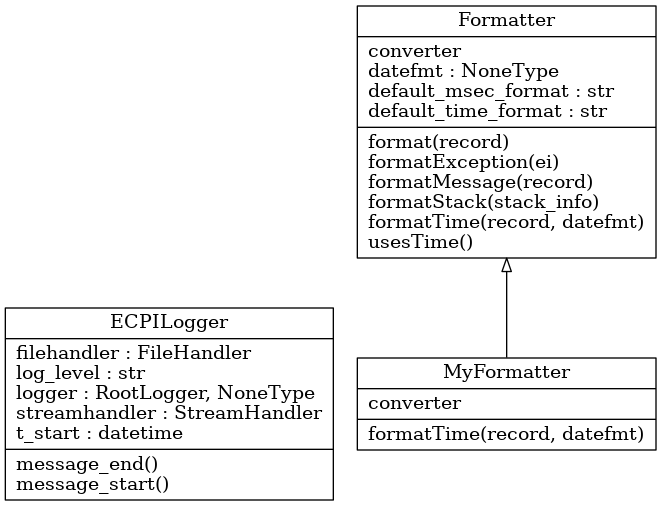
Functions:
Check the validity of the logger level specified in simu_config and choose the appropriate one. |
|
|
|
Returns string with current date, time |
|
Return logger level from file parameters ecpi, ie key logger_level in section general |
Reference
-
class
ECPILogger(log_level='info', log_dest_path=None, stream=True, root='ecpi')[source]¶ Bases:
objectLogger for ECPI
-
class
MyFormatter(fmt=None, datefmt=None, style='%')[source]¶ Bases:
logging.FormatterFormatter without date and with millisecond by default
-
converter()¶ timestamp[, tz] -> tz’s local time from POSIX timestamp.
-
formatTime(record, datefmt=None)[source]¶ Return the creation time of the specified LogRecord as formatted text.
This method should be called from format() by a formatter which wants to make use of a formatted time. This method can be overridden in formatters to provide for any specific requirement, but the basic behaviour is as follows: if datefmt (a string) is specified, it is used with time.strftime() to format the creation time of the record. Otherwise, an ISO8601-like (or RFC 3339-like) format is used. The resulting string is returned. This function uses a user-configurable function to convert the creation time to a tuple. By default, time.localtime() is used; to change this for a particular formatter instance, set the ‘converter’ attribute to a function with the same signature as time.localtime() or time.gmtime(). To change it for all formatters, for example if you want all logging times to be shown in GMT, set the ‘converter’ attribute in the Formatter class.
-
-
check_logger_level(str_level)[source]¶ Check the validity of the logger level specified in simu_config and choose the appropriate one.